DC Motors
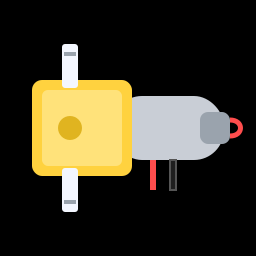
Servos turn to an angle. DC motors just spin, round and round, as long as they have power. They're the muscles in everything from toy cars to electric bikes, and they'll drive your robot's wheels. In this lesson you'll wire up one motor on your desk and control its speed and direction from code.
You'll need:
- 1 × TT gear motor (the yellow ones from the chassis kit)
- 1 × DRV8833 motor driver module
- The 4 × AA battery holder with batteries
- Jumper wires
How a DC motor works
Inside a DC motor are magnets and coils of wire. Push current through the coils and they become electromagnets, which push against the fixed magnets and make the shaft spin. Two simple rules:
- More voltage → faster.
- Reverse the current → it spins the other way.
A bare motor spins very fast (thousands of turns a minute) but with hardly any force. The yellow TT motor has a gearbox built in: a chain of plastic gears that trades speed for strength. The wheel turns slower, but with enough force to push a robot around. That speed-for-force trade is the same reason bikes have gears.
Why you can't plug a motor into a GPIO pin
An ESP32 pin can safely supply about 20 mA. A TT motor needs 100–250 mA while running, and even more (up to around 1 A) for a split second when it starts or gets stuck. Connecting one straight to a pin would, at best, not work, and at worst damage the ESP32.
There's a second problem too: a pin can only switch between 3.3 V and 0 V, so it can't reverse the current to make the motor go backwards.
The solution is a motor driver: a chip that takes small signals from the ESP32 and uses them to switch the big current from a battery.
The H-bridge
Inside the motor driver is a circuit called an H-bridge: four switches arranged in an H shape, with the motor in the middle.
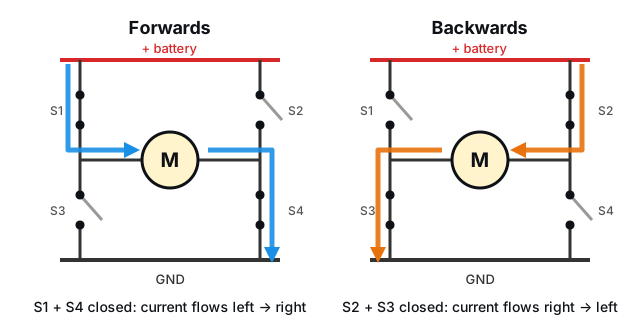
- Close S1 and S4, and current flows through the motor left to right: it spins forwards.
- Close S2 and S3, and the current flows right to left: it spins backwards.
- Open them all, and the motor coasts to a stop.
(Closing S1 and S3 together would connect the battery straight to ground: a short circuit! Driver chips are designed so that can't happen.)
The switches in a real H-bridge are transistors, which can switch on and off thousands of times a second. That's what lets us use PWM to control speed, just like dimming an LED.
The DRV8833 motor driver
The DRV8833 module has two H-bridges, one per motor, which is exactly what a two-wheeled robot needs. It runs from 2.7–10.8 V, so a 4 × AA pack (about 6 V) is perfect.
Each motor is controlled by two input pins:
| IN1 | IN2 | Motor |
|---|---|---|
| 0 | 0 | Coasts (off) |
| PWM | 0 | Forwards, speed set by the PWM duty |
| 0 | PWM | Backwards, speed set by the PWM duty |
| 1 | 1 | Brakes (stops sharply) |
Pin names vary
Different DRV8833 boards label their pins differently. AIN1/AIN2 may be printed as IN1/IN2, and AOUT1/AOUT2 as AO1/AO2 or OUT1/OUT2. The B pins (or IN3/IN4, OUT3/OUT4) control the second motor. VM is sometimes labelled VCC. Some boards also have an EEP, SLP or STBY pin that must be connected to 3V3 to switch the driver on.
Hardware
Do your motors have wires?
Some chassis kits come with motors that have wires already attached, and some come with just two metal tabs, which need wires soldered on. If yours need soldering and you don't have a soldering iron, a local makerspace, school or hobby club can usually help. Or buy TT motors with "pre-soldered wires" (they're very cheap).
Wire up one motor on the breadboard, with the battery pack switched off:
| From | To |
|---|---|
| Battery pack + (red) | DRV8833 VM |
| Battery pack – (black) | DRV8833 GND |
| DRV8833 GND | ESP32 GND (the grounds must be connected!) |
| DRV8833 AIN1 | ESP32 GPIO 16 |
| DRV8833 AIN2 | ESP32 GPIO 17 |
| DRV8833 AOUT1 and AOUT2 | The two motor wires (either way round) |
| DRV8833 EEP / SLP / STBY (if it has one) | ESP32 3V3 |
The ESP32 stays plugged into your computer by USB as usual.
Battery power goes to VM only
The battery pack must only connect to the driver's VM and GND pins, never to the ESP32's 3V3 or VIN pins. The ESP32 gets its power from USB.
Software
On, off and backwards
Before any fancy speed control, here's the truth table above in code. Switch the battery pack on, then run:
# Spin one motor forwards, then backwards, through a DRV8833 driver
import time
from machine import Pin

IN1_PIN = 16   # DRV8833 AIN1
IN2_PIN = 17   # DRV8833 AIN2

in1 = Pin(IN1_PIN, Pin.OUT, value=0)
in2 = Pin(IN2_PIN, Pin.OUT, value=0)

print("Forwards")
in1.on()       # IN1 high, IN2 low: current flows one way
in2.off()
time.sleep(2)

print("Stop")
in1.off()      # both low: the motor coasts to a stop
in2.off()
time.sleep(1)

print("Backwards")
in1.off()      # IN1 low, IN2 high: current flows the other way
in2.on()
time.sleep(2)

in2.off()
print("Done")
The motor should spin one way for two seconds, stop, then spin the other way. If it doesn't move at all, check that the battery pack is switched on, that the DRV8833's GND is connected to the ESP32's GND, and the EEP/SLP pin if your board has one.
Speed control with PWM
Instead of switching IN1 fully on, we can pulse it with PWM. The motor only gets power for part of each pulse, so it runs slower. The duty cycle sets the speed.
# Control a motor's speed and direction with PWM
import time
from machine import Pin, PWM

IN1_PIN = 16
IN2_PIN = 17

# 20,000 pulses a second is too high-pitched to hear, so the motor won't whine
in1 = PWM(Pin(IN1_PIN), freq=20_000, duty_u16=0)
in2 = PWM(Pin(IN2_PIN), freq=20_000, duty_u16=0)


def set_motor(speed):
    # speed: -100 (full reverse) to 100 (full forward), 0 = stop
    speed = max(-100, min(100, speed))
    duty = int(abs(speed) * 65535 / 100)
    if speed > 0:
        in1.duty_u16(duty)   # pulse IN1, hold IN2 low: forwards
        in2.duty_u16(0)
    elif speed < 0:
        in1.duty_u16(0)      # pulse IN2, hold IN1 low: backwards
        in2.duty_u16(duty)
    else:
        in1.duty_u16(0)      # both low: coast
        in2.duty_u16(0)


# speed up gently, then slow down again
for speed in range(0, 101, 5):
    print("Speed", speed)
    set_motor(speed)
    time.sleep_ms(200)
for speed in range(100, -1, -5):
    set_motor(speed)
    time.sleep_ms(100)

time.sleep(1)
print("Full speed backwards")
set_motor(-100)
time.sleep(2)
set_motor(0)
set_motor(speed)takes a number from -100 (full reverse) to 100 (full forwards). The sign picks which input gets the PWM, and the size sets the duty.freq=20_000pulses the motor 20,000 times a second. At lower frequencies, motors make an annoying high-pitched whine. 20 kHz is above what people can hear.
Watch the motor as the speed ramps up: nothing happens at first. At low duty cycles the motor doesn't get enough push to overcome the friction in the gearbox, so it just hums. Most TT motors only start turning at about 30–40 %. Remember this; the robot library will deal with it for you.
Try it in the REPL
Run motor_ramp.py once so set_motor() is defined, press Stop, then try
some speeds yourself:
Challenge
Wire a potentiometer to GPIO 34 (as in the Potentiometers lesson) and use it as a throttle: centre = stopped, turn one way to go forwards, the other way to go backwards.
Show a solution
Add this to the end of motor_ramp.py, in place of the ramps:
from machine import ADC

pot = ADC(Pin(34), atten=ADC.ATTN_11DB)

while True:
    reading = pot.read_u16()              # 0 to 65535
    speed = (reading - 32768) * 100 // 32768   # -100 to 100
    if abs(speed) < 10:
        speed = 0                         # a "dead zone" in the middle
    set_motor(speed)
    time.sleep_ms(50)
The dead zone makes it easy to find "stopped". Without it, the motor would creep whenever the knob was slightly off-centre.
Next up: the robot's eyes for the floor, Line Sensors.