Potentiometers
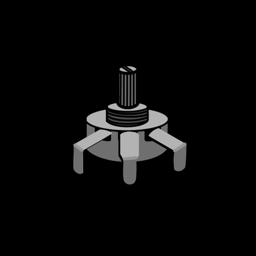
A button is either pressed or not. A potentiometer (a "pot") is a knob that gives you everything in between. It's an analog input, and it's perfect for volume controls, steering, or anything you want to adjust smoothly.
You'll need:
- 1 × 10 kΩ potentiometer
- 3 × jumper wires
- The LED and resistor from the LEDs lesson (for the challenge)
Hardware
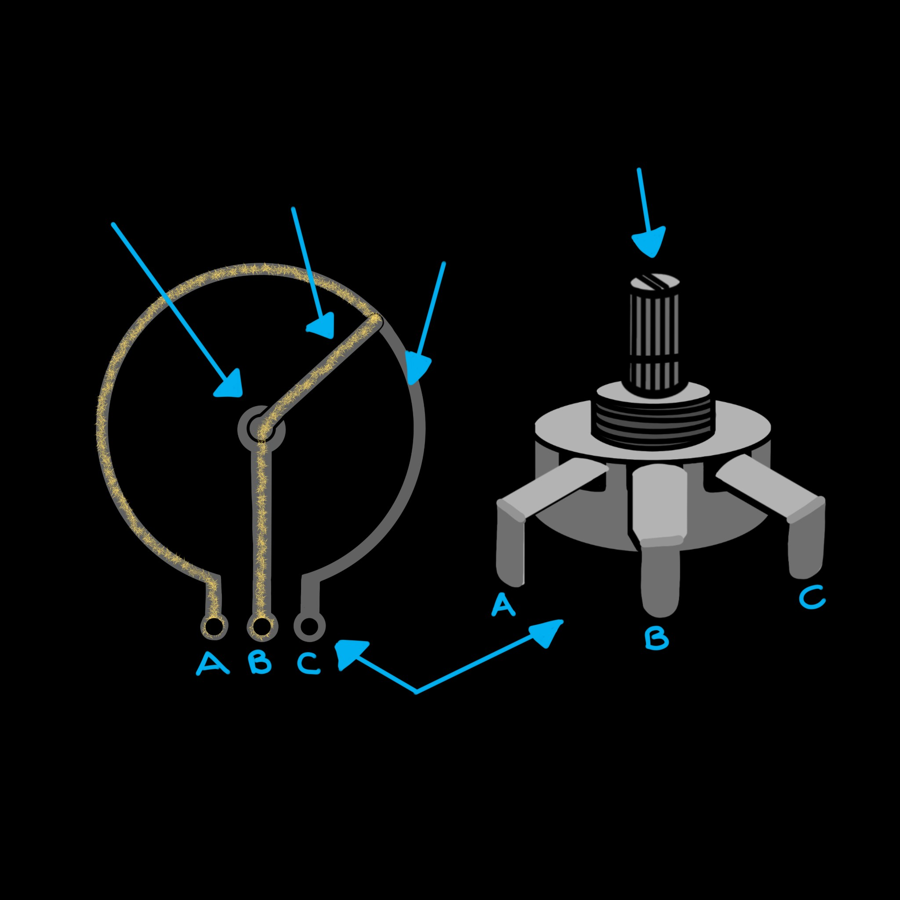
Inside a potentiometer is a curved strip of resistive material (the track) with a leg at each end. A third, middle leg is connected to a wiper that slides along the track as you turn the knob.
Put 3.3 V across the two outer legs, and the wiper picks off a voltage somewhere in between: near 0 V at one end of the turn, near 3.3 V at the other, and about 1.65 V halfway. The ESP32 measures that voltage.
Wiring
| Potentiometer leg | Connect to |
|---|---|
| Outer leg A | ESP32 3V3 |
| Middle leg B (wiper) | ESP32 GPIO 34 |
| Outer leg C | ESP32 GND |
If turning the knob clockwise makes the number go down, just swap the two outer legs.
Use 3V3, not VIN
The ESP32's input pins can only handle up to 3.3 V. Connecting the potentiometer to the 5 V VIN pin could damage the board.
Software
Reading a voltage needs an ADC (analog-to-digital converter) pin. It turns the voltage into a number your code can use.
# Read a potentiometer and print the value twice a second
import time
from machine import ADC, Pin

POT_PIN = 34  # use an ADC1 pin (32-39) so it still works with Wi-Fi on

# ATTN_11DB lets the pin measure the full 0-3.3 V range
pot = ADC(Pin(POT_PIN), atten=ADC.ATTN_11DB)

while True:
    raw = pot.read_u16()             # 0 (0 V) up to 65535 (3.3 V)
    percent = raw * 100 // 65535     # scale to 0-100
    print("raw:", raw, "  percent:", percent)
    time.sleep(0.5)
ADC(Pin(POT_PIN), atten=ADC.ATTN_11DB)creates the ADC. On its own the ESP32's ADC can only measure up to about 1 V. TheATTN_11DBattenuation setting scales the input down so the full 0–3.3 V range fits.pot.read_u16()returns a number from 0 (0 V) to 65535 (3.3 V). That's the same range whichever MicroPython board you use.raw * 100 // 65535scales that to a percentage.//divides and throws away the remainder, so you get a whole number.
Which pins can read analog?
Only GPIO 32–39 (called ADC1) work reliably. The other ADC pins (ADC2) stop working as soon as Wi-Fi is switched on, so this guide always uses 34 and 35 for potentiometers. See the ESP32 Pins page.
Smoothing out the jitter
You'll notice the number wobbles a little even when you're not touching the knob. That's normal: the ESP32's ADC is a bit noisy. Averaging several readings together steadies it:
# Smooth out a jittery potentiometer by averaging several readings
import time
from machine import ADC, Pin

POT_PIN = 34

pot = ADC(Pin(POT_PIN), atten=ADC.ATTN_11DB)


def read_average(adc, samples=16):
    total = 0
    for i in range(samples):
        total += adc.read_u16()
    return total // samples


while True:
    percent = read_average(pot) * 100 // 65535
    print(percent, "%")
    time.sleep(0.2)
The ESP32 is also less accurate at the very ends of the range, so don't worry if the reading never quite reaches exactly 0 or 100 %.
Measuring real volts
pot.read_uv() returns a calibrated reading in microvolts (millionths
of a volt). Divide by 1,000,000 to get volts. Try it in the Shell:
pot.read_uv() / 1_000_000.
Challenge
Use the potentiometer as a dimmer switch for the LED on GPIO 27.
Hint: an LED can't be "half on", but it can be switched on and off so fast
that it looks dimmer. That's called PWM, and you create it with
PWM(Pin(27), freq=1000, duty_u16=0). Then led.duty_u16(value) sets how
much of the time it's on, from 0 to 65535. That's the same range as
read_u16()!
Show a solution
# Turn the potentiometer to dim or brighten the LED
from machine import ADC, PWM, Pin

POT_PIN = 34
LED_PIN = 27

pot = ADC(Pin(POT_PIN), atten=ADC.ATTN_11DB)
led = PWM(Pin(LED_PIN), freq=1000, duty_u16=0)

while True:
    # Both use the same 0-65535 range, so no maths needed!
    led.duty_u16(pot.read_u16())
You'll learn much more about PWM in the next lesson.
Next up: Piezo Buzzers. Time to make some noise.