ESP32 Pins
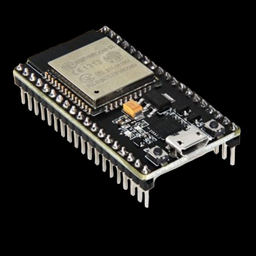
Next to each pin on your ESP32 board is a label. Most are GPIO numbers
(General Purpose Input/Output), and those are the numbers you use in code:
Pin(27) means "the pin labelled 27" (sometimes printed as D27, G27 or
IO27).
This page covers the classic ESP32 DevKit boards (30 or 38 pins, with an ESP32-WROOM-32 module). Other ESP32 chips such as the S3 or C3 have different pins.
Power pins
| Label | What it does |
|---|---|
| 3V3 | A steady 3.3 V supply for sensors, potentiometers and screens. |
| GND | Ground. Every circuit needs a path back to GND. |
| VIN (sometimes 5V) | When the board is powered over USB, this pin gives you about 5 V for hungrier parts such as servo motors and the motion sensor. You can also power the board through this pin (5 V max) when USB isn't plugged in. |
Never connect a power pin straight to GND
Wiring 3V3 or VIN directly to GND (for example through a button with nothing else in the circuit) creates a short circuit. The board heats up quickly and can be permanently damaged. There should always be a component in between that uses the power.
The pin plan used in this guide
Every lesson and project on this site uses the same pins, so you can leave parts plugged in as you move from one lesson to the next.
| Part | GPIO | Notes |
|---|---|---|
| Built-in LED | 2 | Most DevKit boards have a small blue LED on GPIO 2. |
| LED | 27 | Always through a 220–330 Ω resistor. |
| Button A | 14 | Other leg to GND. |
| Button B | 25 | Other leg to GND. |
| Button C | 32 | Other leg to GND. |
| Potentiometer 1 | 34 | Middle leg. Outer legs to 3V3 and GND. |
| Potentiometer 2 | 35 | Middle leg. Outer legs to 3V3 and GND. |
| Piezo buzzer | 26 | Other leg to GND. |
| Servo signal | 13 | Power from VIN, ground to GND. |
| OLED SDA | 21 | I2C data. |
| OLED SCL | 22 | I2C clock. |
| Motion sensor (PIR) output | 33 | Power from VIN, ground to GND. |
| RGB LED red / green / blue | 16 / 17 / 18 | Each through a 220 Ω resistor. Common leg to GND. |
| Light sensor (photoresistor) | 36 | With a 10 kΩ resistor to GND. Often labelled VP. |
| Temperature & humidity (DHT11) | 19 | Power from 3V3. |
| NeoPixels (data in) | 23 | Power from VIN (5 V). |
| Ultrasonic sensor TRIG | 5 | |
| Ultrasonic sensor ECHO | 39 | Often labelled VN. Needs a voltage divider if the sensor runs on 5 V. |
| Touch pads | 4 and 15 | Just a wire, a coin or some foil. |
Projects that break the plan
The Touch Piano needs seven touch-capable pins, so it borrows some from the plan above. Its page tells you which parts to unplug first.
The robot's pin plan
The robot is a separate build, so it reuses some of the pins above for its motors and line sensors.
| Part | GPIO | Notes |
|---|---|---|
| Left motor (DRV8833 AIN1 / AIN2) | 16 / 17 | |
| Right motor (DRV8833 BIN1 / BIN2) | 18 / 19 | |
| Ultrasonic sensor TRIG / ECHO | 5 / 39 | Same as the desk plan. |
| Left line sensor | 34 | |
| Right line sensor | 35 | |
| Servo (scanning head, optional) | 13 | Same as the desk plan. |
| Buzzer | 26 | Same as the desk plan. |
| Start button (Button A) | 14 | Same as the desk plan. |
Every GPIO at a glance
| GPIO | Input | Output | Notes |
|---|---|---|---|
| 0 | ⚠️ | ⚠️ | Boot button. Pulling it LOW at power-up puts the board in download mode. Avoid. |
| 1 | ❌ | ❌ | USB serial TX: used to talk to your computer. |
| 2 | ✅ | ✅ | Connected to the built-in LED on most boards. Must be LOW or floating at boot. |
| 3 | ❌ | ❌ | USB serial RX: used to talk to your computer. |
| 4 | ✅ | ✅ | |
| 5 | ✅ | ✅ | Briefly outputs a signal at boot. |
| 6–11 | ❌ | ❌ | Wired to the board's flash memory. Never use. |
| 12 | ⚠️ | ⚠️ | Boot fails if this pin is HIGH at power-up. Avoid. |
| 13 | ✅ | ✅ | |
| 14 | ✅ | ✅ | Briefly outputs a signal at boot. |
| 15 | ✅ | ✅ | Briefly outputs a signal at boot. |
| 16, 17 | ✅ | ✅ | Used for PSRAM on WROVER modules. Free on WROOM. |
| 18, 19 | ✅ | ✅ | |
| 21 | ✅ | ✅ | Usual I2C SDA (data). |
| 22 | ✅ | ✅ | Usual I2C SCL (clock). |
| 23 | ✅ | ✅ | |
| 25, 26, 27 | ✅ | ✅ | |
| 32, 33 | ✅ | ✅ | Analog input (ADC1). Works with Wi-Fi on. |
| 34, 35, 36, 39 | ✅ | ❌ | Input only, and no internal pull-up resistors. Analog input (ADC1). 36 and 39 are often labelled VP and VN. |
✅ fine to use · ⚠️ works, but can stop the board from starting up · ❌ don't use
Analog input (ADC) pins
Potentiometers and other analog sensors need a pin with an analog-to-digital converter (ADC). The ESP32 has two groups:
- ADC1: GPIO 32–39. Always works. Use these.
- ADC2: GPIO 0, 2, 4, 12–15, 25–27. Stops working whenever Wi-Fi is on: reading one raises an error. Fine for buttons and LEDs, but avoid them for analog sensors.
Output (PWM) pins
Any pin that can be an output can also produce a PWM signal, which is what buzzers and servo motors need. The ESP32 can run up to 16 PWM outputs at once.