Light Sensors

A photoresistor (also called an LDR, a light-dependent resistor) is a resistor that changes with light. In the dark it resists a lot; in bright light it hardly resists at all. Paired with an ordinary resistor, it becomes an analog input, just like a potentiometer, except the "knob" is turned by the light in the room.
You'll need:
- 1 × photoresistor (e.g. GL5528)
- 1 × 10 kΩ resistor (brown, black, orange)
- 3 × jumper wires
- The LED from the LEDs lesson (for the night light example)
Hardware
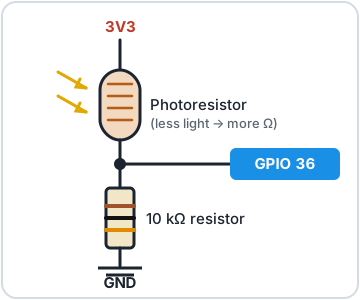
The ESP32 can't measure resistance directly, only voltage. So we build a voltage divider: the photoresistor and a fixed 10 kΩ resistor in a chain between 3V3 and GND, with the ESP32 measuring the voltage at the point where they join.
Think of the two resistors as having a tug-of-war over that middle point:
- Bright light: the photoresistor's resistance drops, 3V3 wins the tug-of-war, and the voltage at the pin goes up.
- Darkness: the photoresistor's resistance rises, GND wins, and the voltage goes down.
Wiring
| From | To |
|---|---|
| ESP32 3V3 | One leg of the photoresistor (either way round) |
| Other leg of the photoresistor | ESP32 GPIO 36 (often labelled VP) |
| ESP32 GPIO 36 | One end of the 10 kΩ resistor |
| Other end of the 10 kΩ resistor | ESP32 GND |
In practice, plug the photoresistor and the resistor into the same breadboard row, then run one wire from that row to GPIO 36.
Software
Reading the sensor works exactly like reading a potentiometer:
# Read a light sensor (photoresistor) and print how bright it is
import time
from machine import ADC, Pin

LDR_PIN = 36   # often labelled VP on the board

ldr = ADC(Pin(LDR_PIN), atten=ADC.ATTN_11DB)

while True:
    raw = ldr.read_u16()          # 0 (dark) to 65535 (very bright)
    percent = raw * 100 // 65535
    print("Light:", raw, "=", percent, "%")
    time.sleep(0.5)
Run it, then cover the sensor with your hand and shine your phone's torch on it. Watch how far the numbers move.
ADC(Pin(LDR_PIN), atten=ADC.ATTN_11DB)sets up GPIO 36 to measure the full 0–3.3 V range.read_u16()gives 0–65535. Bigger means brighter.
Try it in the REPL
Run the last line a few times with your hand over the sensor, and a few times without.Calibrating
Every room is different: your readings might only swing between 8,000 and 40,000. Calibrating means measuring the darkest and brightest values first, then scaling everything to fit between them:
# Calibrate the light sensor, then show a 0-100 % light level
# that uses the full range of YOUR room's lighting
import time
from machine import ADC, Pin

LDR_PIN = 36

ldr = ADC(Pin(LDR_PIN), atten=ADC.ATTN_11DB)

# For 5 seconds, cover the sensor and shine a light on it
# so the code can learn the darkest and brightest readings
print("Calibrating for 5 seconds: cover the sensor, then uncover it!")
darkest = 65535
brightest = 0
start = time.ticks_ms()
while time.ticks_diff(time.ticks_ms(), start) < 5000:
    reading = ldr.read_u16()
    darkest = min(darkest, reading)
    brightest = max(brightest, reading)
print("Darkest:", darkest, " Brightest:", brightest)

if brightest - darkest < 1000:
    brightest = darkest + 1000   # not much change seen: avoid dividing by ~0

while True:
    reading = ldr.read_u16()
    level = (reading - darkest) * 100 // (brightest - darkest)
    level = max(0, min(100, level))   # keep it between 0 and 100
    print("Light level:", level, "%")
    time.sleep(0.3)
- During the first 5 seconds,
min()andmax()keep track of the darkest and brightest readings seen so far. - After that, each reading is scaled so the darkest value becomes 0 % and the brightest becomes 100 %. Readings outside that range are clamped.
An automatic night light
Now make a decision based on the light: switch the LED on GPIO 27 on when it gets dark.
# Turn the LED on automatically when it gets dark
import time
from machine import ADC, Pin

LDR_PIN = 36
LED_PIN = 27
DARK_BELOW = 15000   # adjust using the readings from ldr_read.py

ldr = ADC(Pin(LDR_PIN), atten=ADC.ATTN_11DB)
led = Pin(LED_PIN, Pin.OUT)

while True:
    reading = ldr.read_u16()
    if reading < DARK_BELOW:
        led.on()
    else:
        led.off()
    time.sleep(0.2)
Use ldr_read.py to see what your room reads with the lights on and off,
then set DARK_BELOW somewhere between the two.
Challenge
The night light flickers if the light level hovers right around
DARK_BELOW. Fix it by using two thresholds: turn the LED on below one
value, but only turn it off again above a higher one.
Show a hint
Keep the LED's current state in mind:
if led.value() == 0 and reading < 15000:
    led.on()
elif led.value() == 1 and reading > 20000:
    led.off()
The gap between the two numbers is called hysteresis. Your home thermostat uses the same trick so the heating doesn't click on and off every few seconds.
Next up: Temperature & Humidity: measure the weather indoors.