Project: Motion Alert

Build a gadget that sends a notification to your phone whenever someone walks past. Point it at your bedroom door, the cookie jar, or the front porch. Now your ESP32 is part of the Internet of Things.
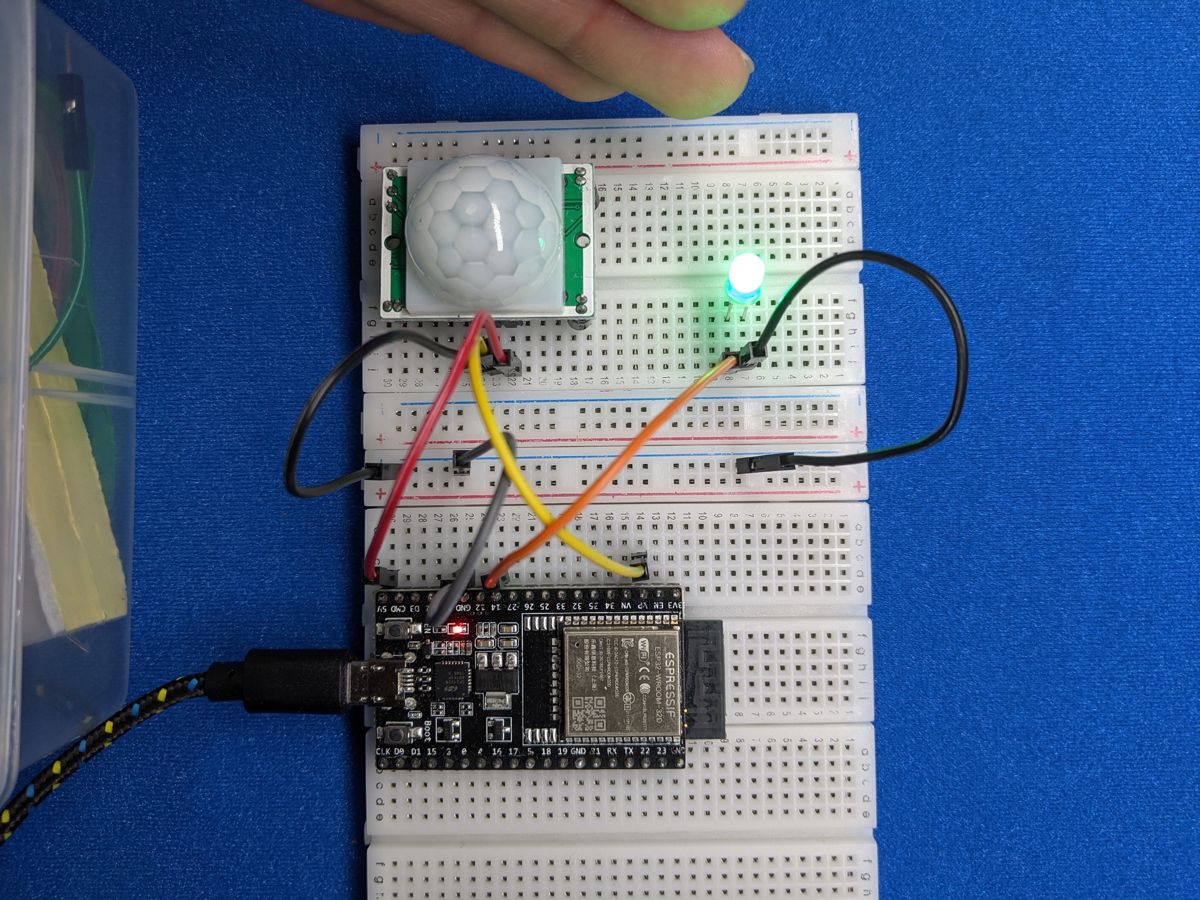
Photo from the first edition. That circuit had no resistor on the LED: add one, as shown in the wiring table.
Objective
- When the motion sensor sees movement, the LED lights up.
- At the start of each movement, the ESP32 sends a push notification to your phone using the free ntfy service.
- After an alert, it waits at least 60 seconds before sending another, so you don't get 50 notifications while someone makes a sandwich.
You'll need:
- 1 × PIR motion sensor (HC-SR501)
- 1 × LED and 1 × 220–330 Ω resistor
- A 2.4 GHz Wi-Fi network
- A phone with the free ntfy app (Android and iPhone), or the ntfy website in a browser
- Jumper wires
Before you start
This project builds on Motion Sensors,
LEDs and Wi-Fi & APIs.
Make sure wifi.py and your secrets.py are saved on your ESP32
(see Saving Programs to the Board).
Wiring
| Part | Pin | Connects to |
|---|---|---|
| Motion sensor | GND | GND |
| OUT | GPIO 33 | |
| VCC | VIN (5 V) | |
| LED | through a 220–330 Ω resistor | GPIO 27 |
| short leg | GND |
Set up notifications with ntfy
ntfy ("notify") is a free service for sending notifications. You don't need an account: you just pick a topic name, subscribe to it on your phone, and anything posted to that topic pops up as a notification.
- Install the ntfy app and tap + to subscribe to a topic.
- Make up a topic name that's long and hard to guess, like
circuitcoder-alex-porch-8f2k1x. Topics are public, so anyone who knows the name can read your alerts or send you fake ones. -
Put the same name in your
secrets.py:
Keep keys and passwords out of your code
The first edition of this guide used a service called IFTTT, and its
example code accidentally published a real, working IFTTT key for
anyone to use. Anything secret (Wi-Fi passwords, API keys, private topic
names) belongs in secrets.py, which you never share or upload.
Your main program just does import secrets.
(IFTTT's webhooks now also need a paid plan, which is another reason this edition switched to ntfy.)
Plan it out
- Set up each component: the motion sensor is a digital input, and the
LED is a digital output. Connect to Wi-Fi with
wifi.connect(). - Break the job into functions.
send_alert()posts a message to your ntfy topic and reports whether it worked.check_wifi()reconnects if the Wi-Fi has dropped out.
- Main loop: read the sensor, light the LED to match, and send an alert when movement starts, as long as the cooldown has passed.
Code
Save this to your ESP32 as main.py, or click Run in Thonny.
# Motion Alert: sends a notification to your phone when the
# motion sensor spots someone, using the free ntfy.sh service.
import time
import network
import requests
from machine import Pin
import wifi
import secrets

PIR_PIN = 33
LED_PIN = 27
COOLDOWN_S = 60   # wait at least this long between notifications

pir = Pin(PIR_PIN, Pin.IN)   # the sensor drives the pin itself: no pull-up
led = Pin(LED_PIN, Pin.OUT)
URL = "https://ntfy.sh/" + secrets.NTFY_TOPIC


def send_alert():
    try:
        response = requests.post(
            URL,
            data="Motion detected!",
            headers={"Title": "CircuitCoder Motion Alert", "Tags": "rotating_light"},
        )
        print("Alert sent, status", response.status_code)
        response.close()   # always close, or the ESP32 runs out of memory
        return True
    except Exception as error:
        print("Couldn't send the alert:", error)
        return False


def check_wifi():
    # reconnect if the Wi-Fi dropped out
    if not network.WLAN(network.WLAN.IF_STA).isconnected():
        print("Wi-Fi lost, reconnecting...")
        try:
            wifi.connect()
        except RuntimeError as error:
            print(error)


wifi.connect()
print("Warming up the sensor (about 30 seconds)...")
time.sleep(30)
print("Watching for motion!")

last_alert = None
was_moving = False

while True:
    moving = pir.value() == 1
    led.value(moving)

    # only act at the START of a movement, not the whole time it lasts
    if moving and not was_moving:
        print("Motion!")
        cooled_down = (last_alert is None or
                       time.time() - last_alert > COOLDOWN_S)
        if cooled_down:
            check_wifi()
            if send_alert():
                last_alert = time.time()
        else:
            print("(still cooling down, no alert sent)")

    was_moving = moving
    time.sleep_ms(100)
How it works
Sending a notification is just a web request
In Wi-Fi & APIs you used a GET request to
fetch data from a website. To send data, you use a POST request.
ntfy turns whatever text you POST to https://ntfy.sh/<your topic> into
a notification:
The optional headers add a title and a 🚨 emoji (rotating_light) to the
notification. Always call response.close() when you're done: the ESP32
only has a small amount of memory, and every open connection uses some.
Only react when motion starts
The sensor's output stays at 1 for as long as it sees movement, which can
be several seconds. To send just one alert, the code compares this reading
with the last one (was_moving). It only acts when the reading has just
changed from 0 to 1. This is called edge detection, and it's the same
idea button.py uses for was_pressed().
Cooldown and error handling
time.time() counts seconds, so time.time() - last_alert > COOLDOWN_S
means "it's been more than 60 seconds since the last alert". Networks are
unreliable, so the request is wrapped in try / except. If it fails, the
program prints why and keeps running instead of crashing. check_wifi()
reconnects if your router drops the connection.
Give the sensor time to warm up
A PIR sensor needs 30–60 seconds after power-up to settle. During that time it may trigger randomly, so the code waits 30 seconds before it starts watching.
Result
Walk past the sensor: the LED lights up, and a second or two later your
phone buzzes with "CircuitCoder Motion Alert: Motion detected!". Walk
past again straight away and the LED still lights, but Thonny's Shell says
(still cooling down, no alert sent).
Make it your own
- Only at night: use
ntptime(see the Alarm Clock) to only send alerts between certain hours. - Visitor counter: count every motion event and include the total in each notification.
- Sound the alarm: add the buzzer on GPIO 26 for a local alarm, and a button to arm and disarm it.