Build the Robot

Time to build! In this step you'll assemble the chassis, mount the electronics, wire everything together, and check that each wheel turns the right way. Take your time. A neat, solid build saves a lot of head-scratching later.
You'll need:
- Everything in the parts list
- A small Phillips screwdriver
- Double-sided foam tape or a few zip ties
1. Assemble the chassis
Every chassis kit is slightly different, so keep your kit's instructions handy. The usual order is:
- Motors. Each TT motor is held to the underside of the base plate by two small acrylic brackets and two long screws. Point the motor shafts outwards, and make sure the two motors mirror each other.
- Wheels. Push a wheel onto each motor shaft. The shaft has flat sides, so line them up with the slot in the wheel and press firmly.
- Caster. Screw the small swivelling caster wheel to the other end of the base plate using the brass spacers, so the robot sits level.
- Battery holder. Mount the 4 × AA holder on top (or underneath) with screws or double-sided tape. Put it near the middle, so the robot doesn't tip.
The end with the caster is the back of the robot, and the end with the motors is the front. (Some builders do it the other way around. It works either way, but this guide assumes the motors are at the front.)
Speed-sensor discs
Many kits include two slotted plastic discs that fit on the motor shafts. They're for speed sensors, which this guide doesn't use. You can leave them off.
2. Mount the electronics
- Breadboard: stick a half-size breadboard on top of the base plate using the tape on its back. Press the ESP32 and the DRV8833 into it.
- Ultrasonic sensor: mount it at the front, facing forwards, with a bit of tape or a bracket. Make sure nothing on the robot is in front of its two "eyes".
- Line sensors: mount both modules underneath the front of the robot, facing down, about 2 cm apart and 5–10 mm above the floor. They should straddle the tape: when the robot is centred on the line, the tape should run between them. Zip ties through the base plate's slots work well.
- Power bank: strap it on with tape or a rubber band, near the ESP32 so the USB cable reaches.
No photos yet
Photos of the finished build are coming soon. In the meantime, the wiring diagram below shows every connection.
3. Power: two supplies, one ground
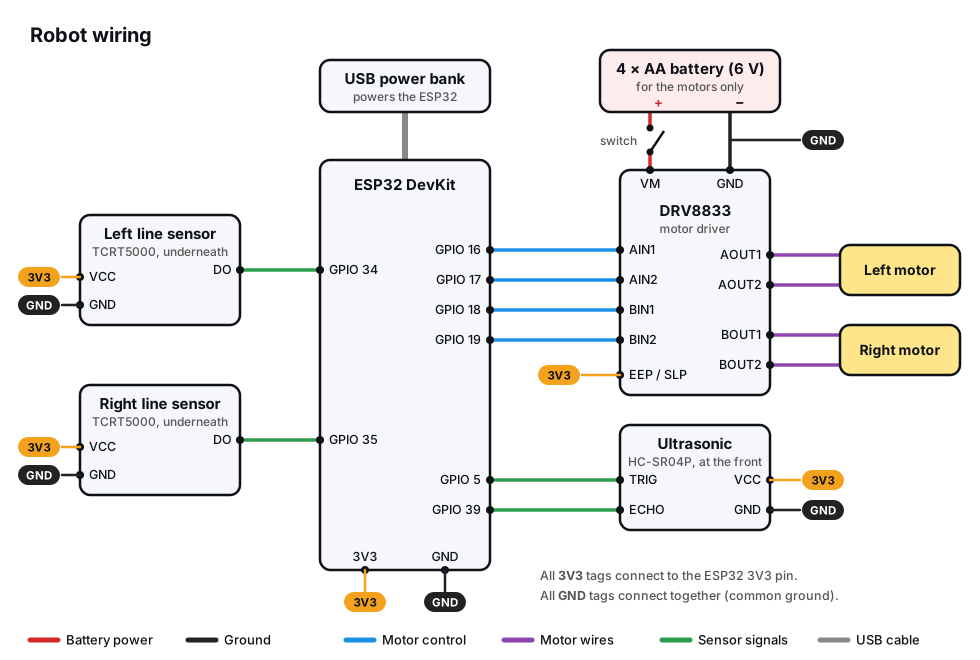
The robot has two separate power supplies:
| Supply | Powers | Connected to |
|---|---|---|
| 4 × AA battery pack (about 6 V) | The motors, through the DRV8833 | DRV8833 VM and GND only |
| USB power bank (5 V) | The ESP32 and the sensors | ESP32 USB socket |
While you're programming, the ESP32 is powered by your computer's USB cable instead of the power bank. Swap to the power bank when it's time to drive around untethered.
Never power the motors from the ESP32
The ESP32's 3V3 and VIN pins can't supply enough current for two motors. Trying it will make the board restart constantly, or damage its regulator. Motor power only comes from the battery pack.
Why the grounds must be connected
The ESP32 tells the DRV8833 what to do by setting its pins to 3.3 V or 0 V. But "3.3 V" only means something compared to a 0 V reference. If the battery pack's ground and the ESP32's ground aren't connected, the driver has no shared reference to measure the ESP32's signals against, and the motors will do nothing (or behave randomly).
So the battery –, the DRV8833 GND and the ESP32 GND must all be wired together. That's the common ground in the diagram. Every GND tag is the same connection. The easiest way to do this is to use one of the breadboard's – rails as a shared ground.
Optional: a capacitor
If the ESP32 misbehaves when the motors start, add an electrolytic capacitor (anywhere from 100 µF to 470 µF, rated 10 V or more) across the DRV8833's VM and GND pins. Its – leg (marked with a stripe) goes to GND. It acts like a tiny reservoir, smoothing out the sudden gulps of current as the motors start.
4. Wire it up
With the battery pack switched off, make these connections, ticking them off as you go:
| From | To |
|---|---|
| Battery + (through the switch) | DRV8833 VM |
| Battery – | DRV8833 GND |
| DRV8833 GND | ESP32 GND |
| DRV8833 EEP / SLP (if it has one) | ESP32 3V3 |
| ESP32 GPIO 16 / 17 | DRV8833 AIN1 / AIN2 |
| ESP32 GPIO 18 / 19 | DRV8833 BIN1 / BIN2 |
| DRV8833 AOUT1 / AOUT2 | Left motor's two wires |
| DRV8833 BOUT1 / BOUT2 | Right motor's two wires |
| Ultrasonic VCC / GND | ESP32 3V3 / GND |
| Ultrasonic TRIG / ECHO | ESP32 GPIO 5 / 39 |
| Left line sensor VCC / GND / DO | ESP32 3V3 / GND / GPIO 34 |
| Right line sensor VCC / GND / DO | ESP32 3V3 / GND / GPIO 35 |
"Left" and "right" are from the robot's point of view: stand behind it, facing the same way it does.
Tidy wiring
Use short wires where you can, and bundle long ones with a small zip tie or tape. Loose wires snag on furniture, and get pulled into the wheels!
5. Test each wheel
Prop the robot up so its wheels are off the ground, switch the battery pack on, and run:
# First power-on test: spin each wheel forwards for 1 second.
# Lift the robot so its wheels are off the ground before running this!
import time
from machine import Pin, PWM

LEFT_PINS = (16, 17)    # DRV8833 AIN1, AIN2
RIGHT_PINS = (18, 19)   # DRV8833 BIN1, BIN2
TEST_POWER = 60         # percent

left_a = PWM(Pin(LEFT_PINS[0]), freq=20_000, duty_u16=0)
left_b = PWM(Pin(LEFT_PINS[1]), freq=20_000, duty_u16=0)
right_a = PWM(Pin(RIGHT_PINS[0]), freq=20_000, duty_u16=0)
right_b = PWM(Pin(RIGHT_PINS[1]), freq=20_000, duty_u16=0)

duty = int(TEST_POWER * 65535 / 100)

print("LEFT wheel forwards...")
left_a.duty_u16(duty)
time.sleep(1)
left_a.duty_u16(0)
time.sleep(1)

print("RIGHT wheel forwards...")
right_a.duty_u16(duty)
time.sleep(1)
right_a.duty_u16(0)

print("Done. Did the correct wheel spin, in the forward direction?")
The left wheel should spin forwards for a second, then the right wheel. Check each one:
| What you see | The fix |
|---|---|
| The wheel spins backwards | Swap that motor's two wires on the DRV8833. |
| The right wheel spins first | The motors are on the wrong outputs. Swap the AOUT and BOUT wire pairs. |
| A wheel doesn't spin at all | Check the battery switch, the common GND wire, the EEP/SLP pin, and that the motor wires are firmly in place. |
| The ESP32 restarts when a motor starts | Make sure the motors aren't powered from the ESP32, and try the capacitor. |
Run the test again until both wheels spin forwards, left then right. Your robot is built!
Copy the libraries
From now on, the robot programs need these library files saved on the
ESP32: robot.py,
button.py
and distance.py.
See Copy library files to the board.
Choosing a power bank
Some power banks switch themselves off after a few seconds if very little current is being drawn, and an ESP32 draws very little. If yours keeps turning off, look for one with an "always on" or "low current" mode (often a double press of its button). Keeping Wi-Fi switched on, as the remote control program does, also draws enough to keep most banks awake.
Next up: make it move. First Drive.