Project: Weather Station
Is it warmer inside or out? Your weather station knows. A DHT11 sensor measures the temperature and humidity in your room, the ESP32 fetches the weather outside from the internet, and the OLED shows them side by side.
Objective
- Show indoor temperature and humidity from the DHT11, updated every 2 seconds.
- Show outdoor temperature and humidity from the free Open-Meteo weather API, updated every 10 minutes.
- Button A switches between °C and °F.
- If something goes wrong (no Wi-Fi, sensor unplugged), show
--instead of crashing.
You'll need:
- 1 × DHT11 temperature & humidity module
- 1 × SSD1306 OLED screen (128 × 64, I2C)
- 1 × push button
- Jumper wires
- A 2.4 GHz Wi-Fi network
Before you start
This project uses what you learned in Temperature & Humidity,
OLED Screens, Wi-Fi & APIs
and Buttons. Make sure button.py,
ssd1306.py, wifi.py and secrets.py (with your Wi-Fi
name and password) are saved on your ESP32 (see
Saving Programs to the Board).
Wiring
| Part | Pin | Connects to |
|---|---|---|
| DHT11 module | + / VCC | 3V3 |
| OUT / DATA | GPIO 19 | |
| – / GND | GND | |
| OLED | GND | GND |
| VCC | 3V3 | |
| SCL | GPIO 22 | |
| SDA | GPIO 21 | |
| Button A | one leg | GPIO 14, other leg to GND |
Set your location
Near the top of the code are two lines for your location:
These are New York's. Search the web for "latitude longitude" and the name of your town, and paste in your own numbers. North and east are positive; south and west are negative.
Plan it out
- Set up each component. The OLED on I2C, the DHT11, and Button A. Then connect to Wi-Fi.
- Break the job into functions.
read_indoor()asks the DHT11 for a new measurement.read_outdoor()asks Open-Meteo for the current weather.format_temp()andformat_humidity()turn numbers into short text, in °C or °F, or--if there's no reading.draw()lays everything out on the screen.
- Call the functions from the main loop, each on its own schedule. Check the button every loop, the DHT11 every 2 seconds, and the internet every 10 minutes.
Code
Save this to your ESP32 as main.py so it runs every time the board
powers up. Or just click Run in Thonny to try it out.
# Weather Station: shows the temperature and humidity indoors (DHT11)
# and outdoors (from the internet) on the OLED screen.
# Button A switches between °C and °F.
import time
import dht
import requests
from machine import Pin, I2C
import ssd1306
import wifi
from button import Button
DHT_PIN = 19
BUTTON_PIN = 14 # Button A
# Change these to where you live (search "latitude longitude <your town>")
LATITUDE = 40.71
LONGITUDE = -74.01
INDOOR_EVERY_MS = 2000 # the DHT11 can only measure every ~1-2 s
OUTDOOR_EVERY_MS = 10 * 60000 # ask the internet every 10 minutes
URL = ("https://api.open-meteo.com/v1/forecast"
"?latitude=" + str(LATITUDE) + "&longitude=" + str(LONGITUDE) +
"¤t=temperature_2m,relative_humidity_2m")
# Step 1: set up each component
i2c = I2C(0, scl=Pin(22), sda=Pin(21))
display = ssd1306.SSD1306_I2C(128, 64, i2c)
sensor = dht.DHT11(Pin(DHT_PIN))
button = Button(BUTTON_PIN)
# None means "no reading yet": shown on screen as --
indoor_temp = None
indoor_humidity = None
outdoor_temp = None
outdoor_humidity = None
fahrenheit = False
# Step 2: small functions for each job
def read_indoor():
global indoor_temp, indoor_humidity
try:
sensor.measure()
indoor_temp = sensor.temperature()
indoor_humidity = sensor.humidity()
except OSError:
print("Couldn't read the DHT11 - check its wiring")
def read_outdoor():
global outdoor_temp, outdoor_humidity
try:
response = requests.get(URL)
current = response.json()["current"]
response.close() # always close, or the ESP32 runs out of memory
outdoor_temp = current["temperature_2m"]
outdoor_humidity = current["relative_humidity_2m"]
print("Outside:", outdoor_temp, "C")
except Exception as error:
print("Couldn't get the outdoor weather:", error)
outdoor_temp = None
outdoor_humidity = None
def format_temp(celsius):
if celsius is None:
return "--"
if fahrenheit:
return str(round(celsius * 9 / 5 + 32)) + "F"
return str(round(celsius)) + "C"
def format_humidity(percent):
if percent is None:
return "--"
return str(round(percent)) + "%"
def draw():
display.fill(0)
display.text("Weather Station", 4, 0, 1)
display.hline(0, 10, 128, 1)
# left column: inside, right column: outside
display.text("Inside", 4, 16, 1)
display.text("Outside", 68, 16, 1)
display.vline(63, 14, 50, 1)
display.text(format_temp(indoor_temp), 12, 32, 1)
display.text(format_temp(outdoor_temp), 76, 32, 1)
display.text(format_humidity(indoor_humidity), 12, 48, 1)
display.text(format_humidity(outdoor_humidity), 76, 48, 1)
display.show()
# Step 3: connect, then update each reading on its own schedule
display.fill(0)
display.text("Connecting...", 4, 28, 1)
display.show()
try:
wifi.connect()
except RuntimeError as error:
print(error) # keep going: indoor readings still work without Wi-Fi
read_indoor()
read_outdoor()
last_indoor = time.ticks_ms()
last_outdoor = time.ticks_ms()
draw()
while True:
now = time.ticks_ms()
if button.was_pressed():
fahrenheit = not fahrenheit
draw()
if time.ticks_diff(now, last_indoor) >= INDOOR_EVERY_MS:
last_indoor = now
read_indoor()
draw()
if time.ticks_diff(now, last_outdoor) >= OUTDOOR_EVERY_MS:
last_outdoor = now
read_outdoor()
draw()
time.sleep_ms(20)
How it works
- Different jobs, different speeds. The button needs checking all the
time, the DHT11 can only take a reading every second or two, and there's
no point asking the internet about the weather more than every few
minutes. Each job gets its own "last time I did this" variable
(
last_indoor,last_outdoor), and the loop checks withtime.ticks_diff()whether enough time has passed. - Planning for failure.
Nonemeans "no reading". Both reading functions wrap their work intry/except, so a loose wire or a Wi-Fi hiccup just prints a message and shows--. The next attempt usually works. Even if Wi-Fi doesn't connect at all, the indoor readings still appear. -
The API answer is a dictionary. The part we want sits under the key
"current":response.close()frees the memory the response used. Forget it, and after a few hours the ESP32 runs out of memory. - °C to °F: multiply by 9, divide by 5, and add 32. The screen redraws as soon as you press the button, so you don't have to wait for the next reading.
Result
After Connecting…, the screen splits into two columns: Inside on the left and Outside on the right, each with the temperature and humidity.
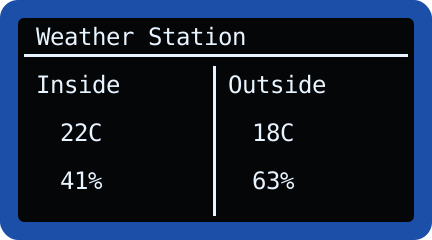
Breathe gently on the DHT11 and watch the indoor humidity climb. Press Button A to switch to Fahrenheit.
Make it your own
- Colour-coded: add an RGB LED that glows blue when it's cold outside and orange when it's warm.
- More weather: Open-Meteo can also tell you the wind speed
(
wind_speed_10m) or whether it's raining (precipitation). Add them to the URL'scurrent=list and put them on a second screen page. - Min and max: keep track of the lowest and highest indoor temperature since the board started.
- Better sensor: a DHT22 is more accurate than a DHT11 and reads tenths
of a degree. Change
dht.DHT11todht.DHT22.