Ultrasonic Sensors
The HC-SR04 ultrasonic sensor measures distance the way bats and submarines do: it sends out a "ping" of sound, far too high-pitched for you to hear, and listens for the echo. The longer the echo takes to come back, the further away the object is. It's the sensor that lets the robot see where it's going.
You'll need:
- 1 × HC-SR04P ultrasonic sensor (the 3.3 V-friendly version), or a classic HC-SR04
- 4 × jumper wires
- For a classic 5 V HC-SR04 only: 1 × 1 kΩ and 1 × 2 kΩ resistor
- The RGB LED from the RGB LEDs lesson (for the challenge)
Hardware
The two silver cylinders are a tiny speaker (the transmitter, marked T) and a microphone (the receiver, marked R). Here's what happens when you take a measurement:
- The ESP32 sends a short pulse to the TRIG pin.
- The sensor fires eight quick clicks of 40 kHz sound (about twice as high as the highest note a human can hear).
- The sensor sets its ECHO pin high, and keeps it high until the echo comes back.
- The ESP32 times how long ECHO stayed high. Sound travels about 343 metres per second, so the time tells us the distance.
Which sensor do you have?
The classic HC-SR04 runs on 5 V, and its ECHO pin sends back a 5 V signal. That's too much for the ESP32, whose pins can only take 3.3 V. The newer HC-SR04P (and the similar RCWL-1601) look almost the same but happily run on 3.3 V. Check the listing, or look for a "P" or "3.3–5 V" on the back of the board.
| Sensor pin | Connect to |
|---|---|
| VCC | ESP32 3V3 |
| Trig | ESP32 GPIO 5 |
| Echo | ESP32 GPIO 39 (often labelled VN) |
| GND | ESP32 GND |
| Sensor pin | Connect to |
|---|---|
| VCC | ESP32 VIN (5 V) |
| Trig | ESP32 GPIO 5 (3.3 V is enough to trigger it) |
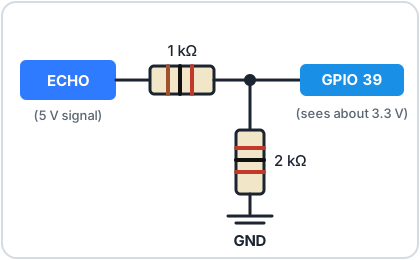
| Echo | 1 kΩ resistor → ESP32 GPIO 39, plus a 2 kΩ resistor from GPIO 39 to GND |
| GND | ESP32 GND |
The two resistors form a voltage divider, like the one in the Light Sensors lesson. It shrinks ECHO's 5 V down to about 3.3 V before it reaches the ESP32.
Don't skip the divider
Connecting a 5 V ECHO pin straight to the ESP32 can damage the pin over time.
GPIO 39 is input-only, which is fine here: the ESP32 only ever listens to ECHO.
Software
How it works, step by step
# Measure distance with an HC-SR04, step by step
import time
from machine import Pin, time_pulse_us

TRIG_PIN = 5
ECHO_PIN = 39   # often labelled VN on the board

trigger = Pin(TRIG_PIN, Pin.OUT, value=0)
echo = Pin(ECHO_PIN, Pin.IN)

while True:
    # 1. Send a 10 microsecond pulse to make the sensor "ping"
    trigger.value(1)
    time.sleep_us(10)
    trigger.value(0)

    # 2. Time how long ECHO stays high: that's how long the sound
    #    took to reach the object and bounce back
    duration = time_pulse_us(echo, 1, 30000)   # give up after 30 ms

    if duration < 0:
        print("Nothing in range")
    else:
        # 3. Sound travels 0.0343 cm per microsecond. Halve it,
        #    because the sound went there AND back.
        distance = duration * 0.0343 / 2
        print(f"{distance:.1f} cm")

    time.sleep_ms(200)
trigger.value(1),time.sleep_us(10),trigger.value(0)sends the 10-microsecond (millionths of a second) pulse that starts a measurement.time_pulse_us(echo, 1, 30000)waits for ECHO to go high (1) and returns how many microseconds it stayed high. If nothing comes back within 30,000 µs, it gives up and returns a negative number.- Sound travels 0.0343 cm per microsecond. The time covers the trip there and back, so we divide by 2.
Point the sensor at a wall and move it closer and further away. Hold a book in front of it, then a cushion. Soft or sloping surfaces soak up or deflect the sound, so the readings get unreliable.
What it can and can't see
The HC-SR04 works best from about 2 cm to 2.5 m, on hard, flat surfaces facing it head-on. It sees in a cone about 30° wide, so it will spot things slightly to the side, too.
The DistanceSensor module
The robot and several projects use this sensor, so we've wrapped it in a
module, just like button.py:
- Download
distance.py(or copy it from the box below). - Save it onto your ESP32 as
distance.py. See Saving Programs to the Board if you need a reminder.
distance.py
# distance.py - measure distance with an HC-SR04 ultrasonic sensor.
#
# Wiring (see the Ultrasonic Sensors lesson):
#   VCC -> 3V3 (HC-SR04P / 3.3 V version) or VIN (classic 5 V HC-SR04)
#   TRIG -> GPIO 5
#   ECHO -> GPIO 39 (through a voltage divider if the sensor runs on 5 V)
#   GND -> GND
#
# Usage:
#   from distance import DistanceSensor
#   sensor = DistanceSensor(trigger_pin=5, echo_pin=39)
#   print(sensor.distance_cm())   # a number, or None if nothing was in range

import time
from machine import Pin, time_pulse_us

# Sound travels about 0.0343 cm per microsecond. The echo time covers the
# trip there AND back, so we halve it.
CM_PER_MICROSECOND = 0.0343 / 2

# The sensor needs a short rest between measurements, or it can hear the
# echo of the previous ping.
MIN_GAP_MS = 60


class DistanceSensor:
    def __init__(self, trigger_pin, echo_pin, max_cm=250):
        self.trigger = Pin(trigger_pin, Pin.OUT, value=0)
        self.echo = Pin(echo_pin, Pin.IN)
        # Longest echo worth waiting for, plus a little extra
        self.timeout_us = int(max_cm / CM_PER_MICROSECOND) + 2000
        self._last_ping = time.ticks_ms() - MIN_GAP_MS

    def distance_cm(self):
        # Wait if we pinged too recently
        wait = MIN_GAP_MS - time.ticks_diff(time.ticks_ms(), self._last_ping)
        if wait > 0:
            time.sleep_ms(wait)

        # A 10 microsecond pulse on TRIG tells the sensor to send a ping
        self.trigger.value(1)
        time.sleep_us(10)
        self.trigger.value(0)
        self._last_ping = time.ticks_ms()

        # ECHO goes high for as long as the sound took to come back
        duration = time_pulse_us(self.echo, 1, self.timeout_us)
        if duration < 0:
            return None   # no echo: nothing in range
        return round(duration * CM_PER_MICROSECOND, 1)
It does the same thing as the step-by-step version, plus one extra: it makes sure there's at least 60 ms between pings, so the sensor never mistakes the echo of an old ping for a new one.
# Measure distance using the DistanceSensor class from distance.py
# (copy distance.py onto your ESP32 first)
import time
from distance import DistanceSensor

sensor = DistanceSensor(trigger_pin=5, echo_pin=39)

while True:
    cm = sensor.distance_cm()
    if cm is None:
        print("Nothing in range")
    else:
        print(cm, "cm")
    time.sleep_ms(200)
DistanceSensor(trigger_pin=5, echo_pin=39)sets up both pins for you.distance_cm()returns the distance in centimetres, orNoneif nothing was in range.Noneis Python's way of saying "no value", andif cm is None:checks for it.
Challenge
Build a traffic-light distance meter with the RGB LED: green when nothing is close, yellow under 50 cm, and red under 20 cm.
Show a solution
# Closer objects light the RGB LED red, far ones green
import time
from machine import Pin
from distance import DistanceSensor

sensor = DistanceSensor(trigger_pin=5, echo_pin=39)
red = Pin(16, Pin.OUT)
green = Pin(17, Pin.OUT)
blue = Pin(18, Pin.OUT)
blue.off()

while True:
    cm = sensor.distance_cm()
    if cm is not None and cm < 20:
        red.on()        # too close!
        green.off()
    elif cm is not None and cm < 50:
        red.on()        # red + green = yellow: getting close
        green.on()
    else:
        red.off()       # all clear
        green.on()
    time.sleep_ms(100)
This is the start of the Parking Sensor project, which adds a beeper that speeds up as you get closer.
Next up: You've met every component. Time to build something with them: head to the Projects.