Project: Sonar Radar
This is real mechatronics: sensing, motion and a display working together. A servo swings an ultrasonic sensor from side to side like a lighthouse, and the OLED draws a radar screen with a sweeping line and a dot wherever it finds something.
Objective
- The servo sweeps the sensor from 0° to 180° and back, forever.
- At each step, the sensor measures the distance straight ahead.
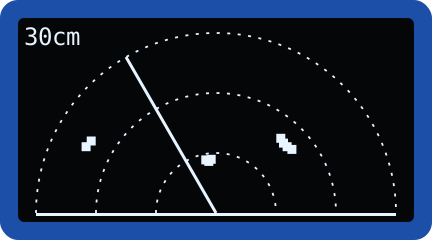
- The OLED shows a radar display: range rings, the sweep line, and a dot for every object within 100 cm.
- Old dots disappear when the sweep passes over them and they're no longer there.
You'll need:
- 1 × SG90 servo motor
- 1 × HC-SR04P ultrasonic sensor (or HC-SR04 with a voltage divider)
- 1 × SSD1306 OLED screen (128 × 64, I2C)
- 4 × female-to-male jumper wires (so the sensor can move freely)
- Tape, a rubber band or hot glue
Before you start
This project uses what you learned in Servo Motors,
Ultrasonic Sensors and
OLED Screens. Make sure distance.py and
ssd1306.py are saved on your ESP32 (see
Saving Programs to the Board).
Build the scanner
- Push the long single-arm (or cross) horn onto the servo.
- Attach the ultrasonic sensor to the horn so its two "eyes" face outwards, using tape, a rubber band, or a dab of hot glue on the back of the sensor. Make sure nothing covers the eyes.
- Connect the sensor with female-to-male jumper wires so it can turn without pulling anything out of the breadboard.
- Tape the servo down to the table (or a small box) so it doesn't walk away while it sweeps.
Wiring
| Part | Pin | Connects to |
|---|---|---|
| Servo | brown / black | GND |
| red | VIN | |
| orange / yellow | GPIO 13 | |
| Ultrasonic sensor | VCC | 3V3 (HC-SR04P) or VIN (5 V HC-SR04) |
| TRIG | GPIO 5 | |
| ECHO | GPIO 39 (VN). Through a voltage divider for a 5 V sensor | |
| GND | GND | |
| OLED | GND | GND |
| VCC | 3V3 | |
| SCL | GPIO 22 | |
| SDA | GPIO 21 |
Plan it out
- Set up each component. The servo (PWM at 50 Hz), the
DistanceSensor, and the OLED. Make an empty dictionary calledblipsto remember what was found at each angle. - Break the job into functions.
set_angle()points the servo, as in the servo lesson.polar_to_screen()turns "an angle and a distance" into x, y pixels.draw_grid()draws the range rings and baseline.draw()draws the grid, the sweep line and every blip.scan(angle)moves, waits, measures, remembers and redraws.
- Call the functions from the main loop. Two
forloops: one sweeping up from 0° to 180°, the other sweeping back down.
Code
Save this to your ESP32 as main.py so it runs every time the board
powers up. Or just click Run in Thonny to try it out.
# Sonar Radar: a servo sweeps an ultrasonic sensor back and forth,
# and the OLED draws what it "sees" like a radar screen.
import math
import time
from machine import Pin, PWM, I2C
import ssd1306
from distance import DistanceSensor

SERVO_PIN = 13
SERVO_MIN_NS = 500_000     # pulse for 0°   (see the Servo lesson)
SERVO_MAX_NS = 2_500_000   # pulse for 180°

RANGE_CM = 100    # objects further away than this aren't drawn
STEP = 3          # degrees to move between measurements
SETTLE_MS = 40    # time for the servo to reach each new angle

# The radar is a half circle: its centre is at the middle of the
# bottom edge of the screen, and its radius fills the screen height.
CENTRE_X = 64
CENTRE_Y = 63
RADIUS = 60

# Step 1: set up each component
servo = PWM(Pin(SERVO_PIN), freq=50, duty_u16=0)
sensor = DistanceSensor(trigger_pin=5, echo_pin=39, max_cm=RANGE_CM + 20)
i2c = I2C(0, scl=Pin(22), sda=Pin(21))
display = ssd1306.SSD1306_I2C(128, 64, i2c)

# One entry per angle we measure: the distance seen there, or None
blips = {}


# Step 2: small functions for each job
def set_angle(angle):
    pulse = SERVO_MIN_NS + (SERVO_MAX_NS - SERVO_MIN_NS) * angle // 180
    servo.duty_ns(pulse)


def polar_to_screen(angle, length):
    # Convert "angle and distance from the centre" into x, y pixels.
    # 0° points right, 90° points straight up, 180° points left.
    radians = math.radians(angle)
    x = CENTRE_X + int(length * math.cos(radians))
    y = CENTRE_Y - int(length * math.sin(radians))
    return x, y


def draw_grid():
    # Three range rings (a third, two thirds and full range)...
    for ring in (RADIUS // 3, 2 * RADIUS // 3, RADIUS):
        for angle in range(0, 181, 6):
            x, y = polar_to_screen(angle, ring)
            display.pixel(x, y, 1)
    # ...and a line along the bottom
    display.hline(CENTRE_X - RADIUS, CENTRE_Y, 2 * RADIUS + 1, 1)


def draw(sweep_angle):
    display.fill(0)
    draw_grid()
    # the sweep line
    x, y = polar_to_screen(sweep_angle, RADIUS)
    display.line(CENTRE_X, CENTRE_Y, x, y, 1)
    # a small filled square for every echo we've seen
    for angle, cm in blips.items():
        bx, by = polar_to_screen(angle, cm * RADIUS // RANGE_CM)
        display.fill_rect(bx - 1, by - 1, 3, 3, 1)
    # the latest distance, in the top-left corner
    cm = blips.get(sweep_angle)
    display.text("--" if cm is None else str(cm) + "cm", 0, 0, 1)
    display.show()


def scan(angle):
    set_angle(angle)
    time.sleep_ms(SETTLE_MS)
    cm = sensor.distance_cm()
    # Replace whatever was at this angle last time: that's what
    # clears old blips as the sweep passes over them.
    if cm is not None and cm <= RANGE_CM:
        blips[angle] = int(cm)
    elif angle in blips:
        del blips[angle]
    print(angle, "degrees:", cm, "cm")
    draw(angle)


# Step 3: sweep left to right, then right to left, forever
while True:
    for angle in range(0, 181, STEP):
        scan(angle)
    for angle in range(180, -1, -STEP):
        scan(angle)
How it works
-
Polar to screen coordinates. The sensor gives us an angle and a distance, but the screen needs x and y. That's exactly what trigonometry is for:
math.radians()converts degrees into radians, the unit thatcos()andsin()expect. Theyline uses minus because on the screen y grows downwards, but we want 90° to point up. - Scaling distance to pixels. The radar's radius is 60 pixels and it shows up to 100 cm, so each blip is drawn atcm * 60 // 100pixels from the centre. - Theblipsdictionary uses the angle as the key and the distance as the value. Each time the sweep reaches an angle, that angle's entry is replaced with the new reading, or deleted if nothing's there any more. That's how old dots vanish as the sweep line passes. - Let the servo settle. After each move,time.sleep_ms(SETTLE_MS)gives the servo 40 ms to arrive before measuring. Measure too early and you'd be pinging while the sensor is still turning.
Result
The servo starts ticking across in 3° steps and the radar screen comes to life: a line sweeps around the half circle, and dots appear where your walls, cups and hands are. Put a mug 30 cm in front and watch a cluster of dots appear at the matching spot on the screen. The Shell prints every angle and distance too.
Make it your own
- Speed vs. detail: change
STEPto 1 for a sharper picture, or 6 for a faster sweep. - Intruder alarm: sound the buzzer if anything appears closer than 30 cm.
- Zoom: add a potentiometer on GPIO 34 that changes
RANGE_CMbetween 30 and 200 cm. - Put it on wheels: this scanning head is exactly what the robot uses to look around before it turns.