Project: Alarm Clock

The capstone project brings together nearly everything you've learned: buttons, a buzzer, the OLED screen, Wi-Fi, and a program with several "modes". You'll build a clock that sets itself from the internet, with an alarm, a stopwatch and a countdown timer.
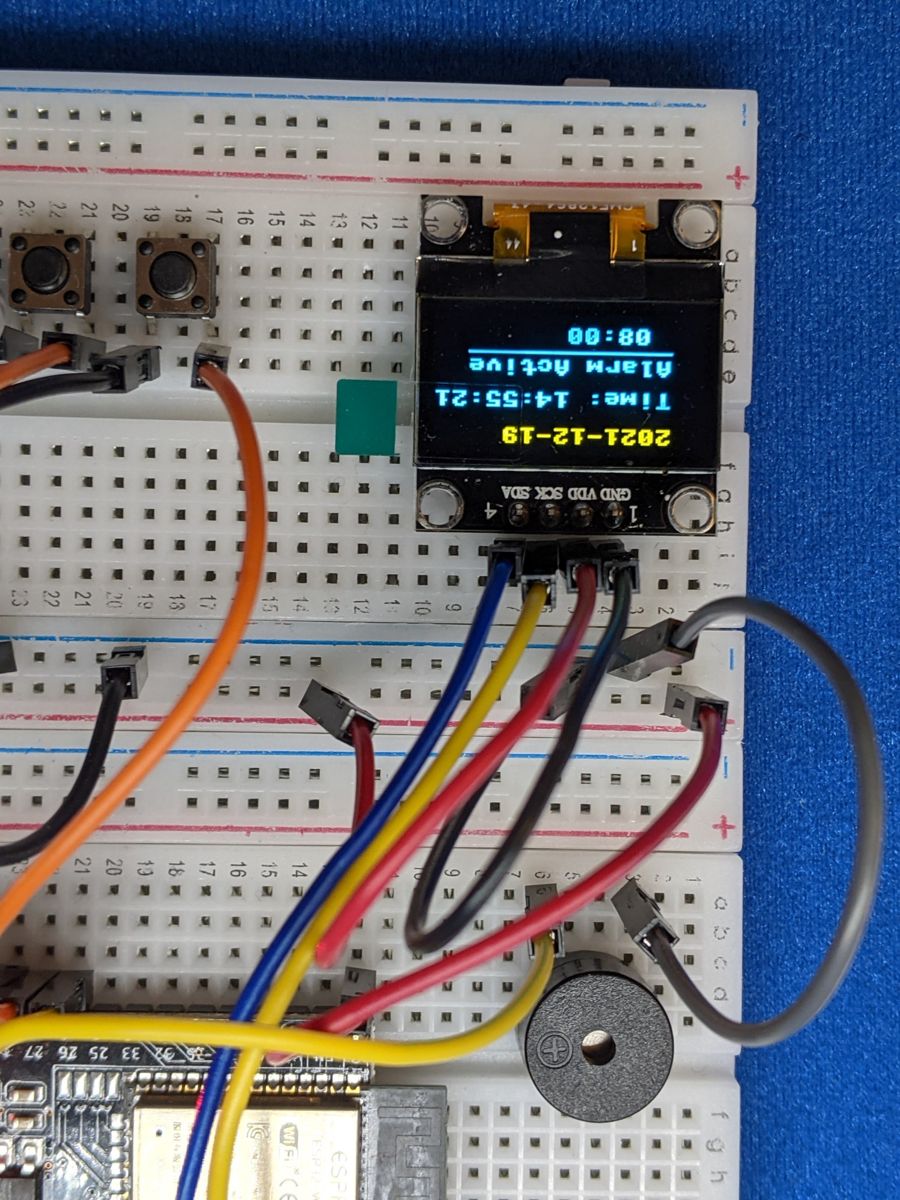
Photo from the first edition. Follow the wiring table for pin numbers.
Objective
The clock has four pages. Buttons A and C flip between them, and Button B does something different on each one:
| Page | What it shows | What Button B does |
|---|---|---|
| Clock | Date, time, and whether the alarm is set | Turns the alarm on or off |
| Set Alarm | The alarm time | Edit → hours → minutes → save (A/C change the number) |
| Stopwatch | Minutes, seconds and tenths | Start → stop → reset |
| Timer | A countdown | Edit → minutes → seconds → start (press again to cancel) |
When the alarm or timer goes off, the buzzer beeps until you press any button.
You'll need:
- 1 × SSD1306 OLED screen (128 × 64, I2C)
- 3 × push buttons
- 1 × passive piezo buzzer
- A 2.4 GHz Wi-Fi network
- Jumper wires
Before you start
This project builds on OLED Screens,
Buttons, Piezo Buzzers
and Wi-Fi & APIs. Make sure button.py,
ssd1306.py, wifi.py and your secrets.py are saved on your
ESP32 (see Saving Programs to the Board).
Wiring
| Part | Pin | Connects to |
|---|---|---|
| OLED | GND | GND |
| VCC | 3V3 | |
| SCL | GPIO 22 | |
| SDA | GPIO 21 | |
| Button A (previous) | one leg | GPIO 14, other leg to GND |
| Button B (select) | one leg | GPIO 25, other leg to GND |
| Button C (next) | one leg | GPIO 32, other leg to GND |
| Buzzer | + leg | GPIO 26 |
| – leg | GND |
Line the buttons up A – B – C from left to right, so the outside two act like arrows and the middle one like "OK".
Set your time zone
The ESP32 gets the time from an internet time server using NTP
(Network Time Protocol). Time servers always give UTC, the time in
London in winter, so you need to tell the clock how far your time zone is
from UTC. Add this line to your secrets.py:
Some examples: Los Angeles -8 (summer -7), Chicago -6 (-5),
London 0 (1), Berlin 1 (2), India 5.5, Sydney 10 (11 in
their summer).
About daylight saving time
This clock doesn't know about daylight saving time. The rules differ in
every country and change over the years. When your clocks go forward
or back, update UTC_OFFSET_HOURS in secrets.py. (Making the clock
handle DST automatically is a great challenge if you want one!)
Plan it out
This is the biggest program in the guide, so planning really pays off.
- Set up the components (three buttons, buzzer and screen), then connect to Wi-Fi and set the clock.
- Keep track of the state. Instead of lots of separate loops, the
program has one main loop and a handful of variables that describe
what's going on right now: which
pageyou're on, what you'reediting, whether the stopwatch or timer is running, and whether the buzzer isringing. - Break the job into functions.
press_select()andpress_arrow()decide what a button press means on the current page.check_alarm()andcheck_timer()start the buzzer at the right time.update_buzzer()beeps on and off while ringing.draw()draws the current page.
- Main loop: check buttons → check alarm and timer → update buzzer → redraw the screen, about 200 times a second.
Code
Save this to your ESP32 as main.py so your clock starts whenever it's
plugged in.
# Alarm Clock: a clock, alarm, stopwatch and countdown timer in one.
#   Button A = previous page   Button B = select   Button C = next page
# The time comes from the internet (NTP), so no setting the clock!
import time
import ntptime
from machine import Pin, PWM, I2C
import ssd1306
import wifi
import secrets
from button import Button

BUTTON_A_PIN = 14
BUTTON_B_PIN = 25
BUTTON_C_PIN = 32
BUZZER_PIN = 26
SDA_PIN = 21
SCL_PIN = 22

# ---------------- set up the parts ----------------
button_a = Button(BUTTON_A_PIN)
button_b = Button(BUTTON_B_PIN)
button_c = Button(BUTTON_C_PIN)
buzzer = PWM(Pin(BUZZER_PIN), freq=1000, duty_u16=0)
i2c = I2C(0, scl=Pin(SCL_PIN), sda=Pin(SDA_PIN))
display = ssd1306.SSD1306_I2C(128, 64, i2c)

PAGES = ["Clock", "Set Alarm", "Stopwatch", "Timer"]
page = 0
editing = None      # which number is being changed, e.g. "hour", or None

alarm_on = False
alarm_hour = 7
alarm_minute = 0
alarm_done = None   # the (day, hour, minute) the alarm last went off

stopwatch_running = False
stopwatch_start = 0     # ticks_ms when it was started
stopwatch_total = 0     # ms counted before the last stop

timer_minutes = 5
timer_seconds = 0
timer_running = False
timer_end = 0           # time.time() when the countdown finishes

ringing = False
last_sync = 0


# ---------------- time helpers ----------------
def sync_clock():
    # set the ESP32's clock from the internet (in UTC)
    global last_sync
    try:
        ntptime.settime()
        print("Clock synced")
    except OSError as error:
        print("Couldn't sync the clock:", error)
    # remember when we last tried, so a failed sync isn't retried every loop
    last_sync = time.time()


def local_time():
    # (year, month, day, hour, minute, second, weekday, yearday)
    # int() so half-hour offsets like 5.5 (India) work too
    return time.localtime(time.time() + int(secrets.UTC_OFFSET_HOURS * 3600))


def two_digits(number):
    return "{:02d}".format(number)


# ---------------- buzzer ----------------
def update_buzzer():
    # while ringing, beep on and off every 200 ms
    if ringing and (time.ticks_ms() // 200) % 2 == 0:
        buzzer.duty_u16(32768)
    else:
        buzzer.duty_u16(0)


# ---------------- what each button does ----------------
def press_select():
    global alarm_on, editing, alarm_done
    global stopwatch_running, stopwatch_start, stopwatch_total
    global timer_running, timer_end
    name = PAGES[page]
    if name == "Clock":
        alarm_on = not alarm_on
    elif name == "Set Alarm":
        # B steps through: not editing -> hour -> minute -> saved
        if editing is None:
            editing = "hour"
        elif editing == "hour":
            editing = "minute"
        else:
            editing = None
            alarm_on = True
            alarm_done = None
    elif name == "Stopwatch":
        # B steps through: start -> stop -> reset
        if stopwatch_running:
            stopwatch_total += time.ticks_diff(time.ticks_ms(), stopwatch_start)
            stopwatch_running = False
        elif stopwatch_total > 0:
            stopwatch_total = 0
        else:
            stopwatch_start = time.ticks_ms()
            stopwatch_running = True
    elif name == "Timer":
        # B steps through: minutes -> seconds -> start -> cancel
        if timer_running:
            timer_running = False
        elif editing is None:
            editing = "minutes"
        elif editing == "minutes":
            editing = "seconds"
        else:
            editing = None
            timer_end = time.time() + timer_minutes * 60 + timer_seconds
            timer_running = True


def press_arrow(change):
    # A and C: change the number being edited, or switch page
    global page, alarm_hour, alarm_minute, timer_minutes, timer_seconds
    if editing == "hour":
        alarm_hour = (alarm_hour + change) % 24
    elif editing == "minute":
        alarm_minute = (alarm_minute + change) % 60
    elif editing == "minutes":
        timer_minutes = (timer_minutes + change) % 100
    elif editing == "seconds":
        timer_seconds = (timer_seconds + change) % 60
    else:
        page = (page + change) % len(PAGES)


def check_buttons():
    global ringing
    a = button_a.was_pressed()
    b = button_b.was_pressed()
    c = button_c.was_pressed()
    if ringing:
        if a or b or c:          # any button silences the buzzer
            ringing = False
        return
    if b:
        press_select()
    if a:
        press_arrow(-1)
    if c:
        press_arrow(+1)


# ---------------- alarm and timer ----------------
def check_alarm(now):
    global ringing, alarm_done
    today_now = (now[2], now[3], now[4])   # (day, hour, minute)
    if (alarm_on and now[3] == alarm_hour and now[4] == alarm_minute
            and alarm_done != today_now):
        alarm_done = today_now   # so it only goes off once
        ringing = True


def check_timer():
    global ringing, timer_running
    if timer_running and time.time() >= timer_end:
        timer_running = False
        ringing = True


# ---------------- drawing the screen ----------------
def underline(x, characters):
    display.hline(x, 44, characters * 8, 1)


def draw(now):
    display.fill(0)
    display.text("< " + PAGES[page] + " >", 0, 0, 1)
    display.hline(0, 11, 128, 1)
    name = PAGES[page]

    if name == "Clock":
        date = "{}-{}-{}".format(now[0], two_digits(now[1]), two_digits(now[2]))
        clock = "{}:{}:{}".format(two_digits(now[3]), two_digits(now[4]),
                                  two_digits(now[5]))
        display.text(date, 0, 20, 1)
        display.text(clock, 0, 34, 1)
        alarm_text = "Alarm " + two_digits(alarm_hour) + ":" + two_digits(alarm_minute)
        display.text(alarm_text if alarm_on else "Alarm off", 0, 52, 1)

    elif name == "Set Alarm":
        display.text(two_digits(alarm_hour) + ":" + two_digits(alarm_minute), 0, 34, 1)
        if editing == "hour":
            underline(0, 2)
        elif editing == "minute":
            underline(24, 2)
        display.text("B: edit/save", 0, 52, 1)

    elif name == "Stopwatch":
        total = stopwatch_total
        if stopwatch_running:
            total += time.ticks_diff(time.ticks_ms(), stopwatch_start)
        text = "{}:{}.{}".format(two_digits(total // 60000),
                                 two_digits(total // 1000 % 60), total // 100 % 10)
        display.text(text, 0, 34, 1)
        display.text("B: go/stop/reset", 0, 52, 1)

    elif name == "Timer":
        if timer_running:
            left = max(0, timer_end - time.time())
            minutes, seconds = left // 60, left % 60
        else:
            minutes, seconds = timer_minutes, timer_seconds
        display.text(two_digits(minutes) + ":" + two_digits(seconds), 0, 34, 1)
        if editing == "minutes":
            underline(0, 2)
        elif editing == "seconds":
            underline(24, 2)
        display.text("B: set/start", 0, 52, 1)

    if ringing:
        display.fill_rect(0, 16, 128, 48, 1)
        display.text("RING RING!", 24, 28, 0)
        display.text("Press a button", 8, 44, 0)
    display.show()


# ---------------- main program ----------------
display.fill(0)
display.text("Connecting...", 0, 0, 1)
display.show()
wifi.connect()
sync_clock()

last_draw = 0
while True:
    check_buttons()
    now = local_time()
    check_alarm(now)
    check_timer()
    update_buzzer()

    if time.time() - last_sync > 3600:   # re-sync once an hour
        sync_clock()

    # redraw 10 times a second; drawing every loop would slow the buttons
    if time.ticks_diff(time.ticks_ms(), last_draw) > 100:
        last_draw = time.ticks_ms()
        draw(now)
    time.sleep_ms(5)
How it works
Getting the time
ntptime.settime() asks a time server for the current time and sets the
ESP32's internal clock (its RTC) to UTC. From then on, time.time()
counts the seconds by itself, even without Wi-Fi. The clock drifts by a
few seconds a day, so the main loop re-syncs once an hour.
local_time() adds your offset and splits the result into parts with
time.localtime():
so now[3] is the hour, now[4] the minute, and so on.
One loop, many modes
The first edition used a separate while True loop for every mode. That
got complicated, and while one loop ran, nothing else could happen: the
alarm couldn't ring while you were using the stopwatch.
This version uses a state machine. There's only one loop, and
variables like page, editing and timer_running remember what
mode the clock is in. Each button press just changes those variables.
Look at press_select() on the Set Alarm page:
if editing is None:
    editing = "hour"        # 1st press: start editing the hour
elif editing == "hour":
    editing = "minute"      # 2nd press: move on to the minutes
else:
    editing = None          # 3rd press: save
Because the loop never gets stuck, the alarm, timer and stopwatch all keep working no matter which page you're looking at.
Wrapping numbers with %
(alarm_hour + change) % 24 keeps the hour between 0 and 23: going up from
23 gives 24 % 24 = 0, and going down from 0 gives -1 % 24 = 23. Minutes
and seconds wrap the same way with % 60.
Making the alarm ring only once
The alarm checks whether the current hour and minute match. But that stays
true for a whole minute, so after you silence it, it would start ringing
again straight away! alarm_done remembers the (day, hour, minute) the
alarm last rang, and it won't ring twice for the same one.
Result
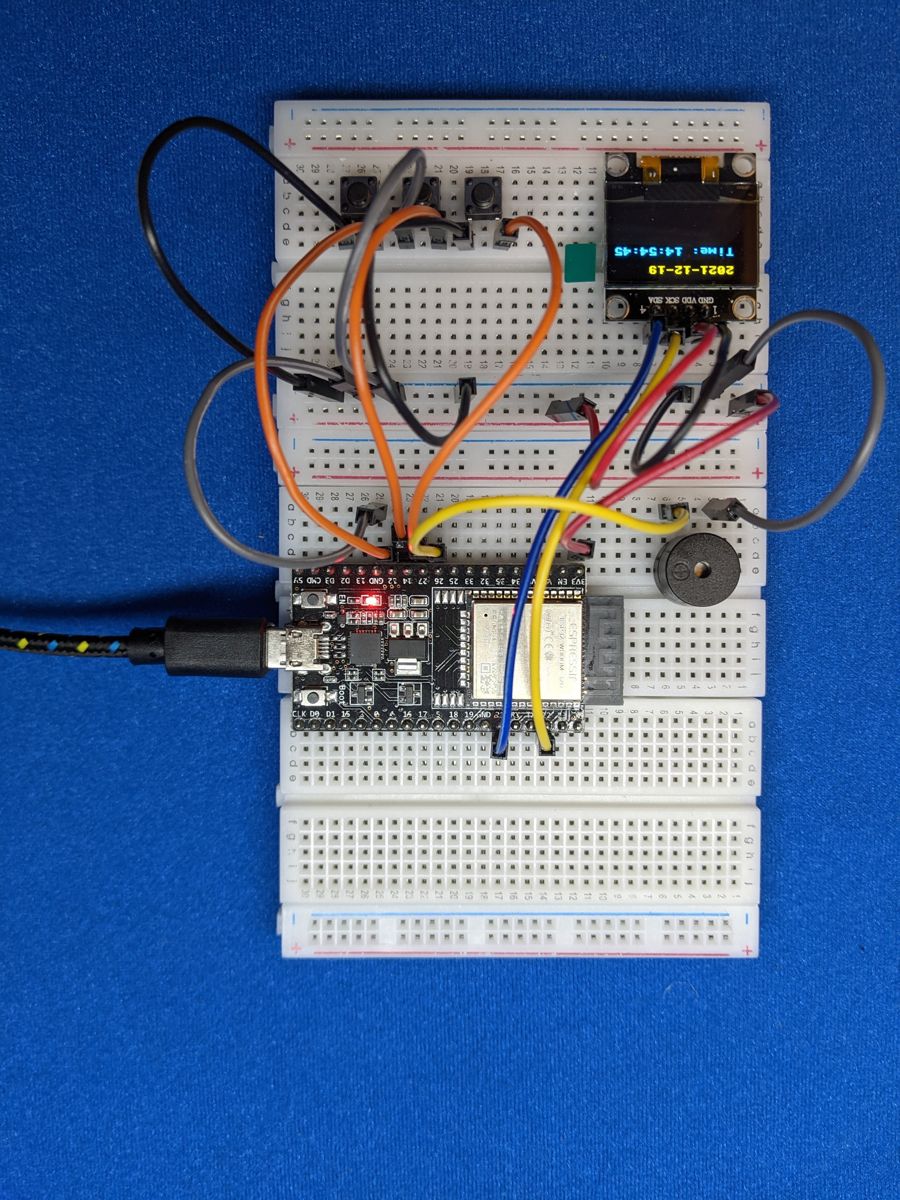
Photos from the first edition. Follow the wiring table for pin numbers.
Make it your own
- Snooze: make Button B silence the alarm for 5 minutes, and only A or C turn it off for good.
- Big digits: the built-in font is only 8 pixels tall. Draw your own
large numbers with
display.fill_rect()so the time is readable from across the room. - Weather page: add a fifth page that shows the temperature, fetched from a free weather API such as Open-Meteo (see Wi-Fi & APIs for how to make the request).
- Sunrise light: add an LED that fades up over the 10 minutes before the alarm, using PWM.